Math Trivia and Quiz Questions That Look Like Math
Square roots, exponents and fractions now show up as real math in Nontrivial games, students can type math answers on a math keyboard, and any equal answer counts.
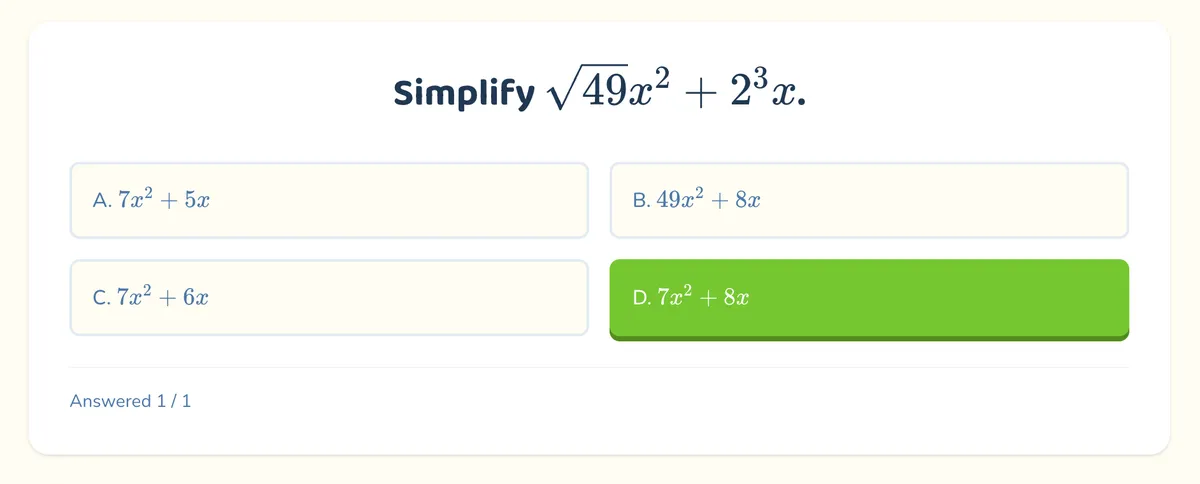
Until now, math in Nontrivial was plain text. A square was x^2, a square root was sqrt(49), and a fraction was a slash in the middle of a sentence. Students could usually work out what was meant, but it didn't look like their textbook, and a question that's hard to read is harder than it needs to be.
Now it looks like math. The question above is from a real game: a proper square root sign, small raised exponents, and answer choices set the same way as the question. (The answer is D. The square root of 49 is 7, and 2 cubed is 8.)
Where you'll see it
Math is set properly everywhere it appears in a game: the question, the answer choices, the explanation shown after each question, and the results at the end. It also shows up that way when you browse and edit your question sets.
There's nothing to switch on. If a question has math in it, Nontrivial shows it as math.
Typing the answer instead of picking it
Multiple choice checks whether a student can recognize the right answer. Sometimes you want them to work it out and write it down.
For that, use a Text Input question. When the answer is math, players get a math keyboard on phones and tablets, with keys for exponents, square roots, fractions and the rest, so nobody has to hunt for a caret symbol. On a computer they can type it straight in.
Nontrivial grades the answer by what it's worth, not how it's written. If the answer is 2x + 2, then 2(x + 1) is also right, and so is 2 + 2x. Nobody loses a point for putting the terms in a different order.
Sometimes the form is the point. If you ask a student to factor x² + x − 6, you want (x − 2)(x + 3), not the expression you started with. So a math answer can require a form: Factored, Expanded or Simplified, or Any form when you only care that the value is right.
Writing your own math questions
In the question editor, choose Text Input, write the question and type the correct answer. If the question shows math and your answer looks like math, Nontrivial ticks Math answer for you. It also picks the form from your wording: "factor" gets Factored, "expand" gets Expanded, "simplify" gets Simplified, and anything else gets Any form.
You can change either one. Untick Math answer if you'd rather the answer be checked as plain text, or pick a different form. If you require a form, say so in the question, because an equal answer in another form will be marked wrong.
A question can contain math without the answer being math. "Who proved that aⁿ + bⁿ = cⁿ has no whole-number solutions when n > 2?" has an answer of Andrew Wiles, and Nontrivial leaves that as a text answer.
Games from a math study guide
Upload a math worksheet or study guide as a PDF, under Generate with AI and Generate from Content, and Nontrivial writes questions from it with the math set properly.
Before the questions reach you, Nontrivial works each problem a second time and checks it. If the answer key is wrong, a wrong choice is accidentally right, or the explanation doesn't add up, it fixes the question rather than throwing it away. That goes for word problems too, where the math is hidden in a sentence about trains or pizza slices. The same check runs when you generate a full set with slides and polls.
Ways to use it
- Homework review. Turn last night's worksheet into a ten-minute game at the start of class, so you can see which problems tripped people up before you go over them.
- Test prep. Upload the unit study guide and play it the day before the test.
- Make them write it. Use Text Input questions so students have to produce the answer, not just spot it in a list.
- Family math night. Mix a few algebra questions in with the usual trivia and see who remembers how to factor.
Details
- Math shows up properly when you play in a web browser, on a computer, phone or tablet. The Nontrivial apps for iPhone, Android and TV don't show it yet, so use the browser for math-heavy games for now.
- If the math keyboard can't load, players get a regular text box and can type answers in plain form, like 2(x+1), x^2 or sqrt(x).
- When you write questions by hand, put math between \( and \), for example \(x^2 + 1\), and it will be shown as math.
To try it, open Questions, pick a set, press Generate with AI and upload a math study guide.